
Nearshore virtual executive assistants have quietly become the go-to solution for founders and operators drowning in email. While offshore VAs in the Philippines or India batch-process messages overnight, a nearshore EA based in Latin America works your exact business hours — reading, sorting, and responding to your inbox in real time, the same way an in-office chief of staff would. If you've ever opened your laptop at 7am to find 90 unread messages, this post breaks down exactly how a virtual EA handles that chaos.
What Does "Inbox Triage" Actually Mean for a Virtual EA in 2026?
Inbox triage is the systematic process of sorting incoming email by urgency, category, and required action before the executive ever sees it. Think of it like emergency room triage: not every message is a cardiac arrest, and a skilled EA knows the difference between a vendor invoice that can wait 48 hours and a client escalation that needs a response in 20 minutes.
For a virtual EA, triage typically runs on a defined priority matrix: Tier 1 (respond same hour), Tier 2 (respond same day), Tier 3 (file or unsubscribe). The EA applies this matrix consistently so your inbox only surfaces decisions that genuinely require your judgment. According to McKinsey Global Institute (2023), knowledge workers spend 28% of their workweek managing email — nearly 13 hours every week that a trained EA can reclaim for you.
A strong virtual EA doesn't just delete spam. They build and maintain a living system: Gmail filters or Outlook rules, folder hierarchies, color-coded labels, and a shared "needs your input" digest that lands in your inbox once or twice a day. Over time, the system learns your preferences and the volume of escalations drops. If you're evaluating full-service EA support, our guide to the best virtual executive assistant services in 2026 covers how to compare providers before you hire.
How a Nearshore EA Builds Your Email Management System in 2026
The setup phase — usually the first five business days — is where most of the structural work happens. A good nearshore EA interviews you (or reviews a written SOP) to map your contact universe: who gets same-day replies, who gets a templated acknowledgment, which senders should ring your phone immediately. That map becomes the operating system for everything that follows.
Here's the standard onboarding sequence Rose uses when placing a virtual EA for inbox management:
Intake & Contact Mapping
The EA reviews 30 days of sent mail to identify your top 20 contacts and tone preferences. This becomes the reply style guide.
Filter & Label Architecture
Filters, labels, and folder rules are built in Gmail or Outlook. Newsletters, invoices, and internal threads each route automatically.
Template Library Creation
The EA drafts 10–20 reusable reply templates for your most common message types — meeting requests, vendor follow-ups, client acknowledgments.
Daily Digest Protocol
A twice-daily summary (9am and 2pm your time) flags every open item requiring your direct decision, with suggested replies pre-drafted.
Continuous Refinement
Weekly 15-minute syncs allow you to override categorizations and train the EA's judgment over time until escalations drop to a handful per day.
Because Latin America shares US time zones (EST/CST/PST overlap is near-perfect), your EA is live when your contacts are live. That's a structural advantage no overnight-batch offshore model can replicate. The U.S. Bureau of Labor Statistics (2024) reports that administrative assistant roles requiring real-time communication coordination command 18% higher productivity ratings than asynchronous equivalents — a gap that maps directly to timezone alignment.

How AI Copilots Are Changing Virtual EA Email Management in 2026
Every Rose team member ships with a role-specific AI copilot trained on the tools they use daily. For executive assistants handling email, that means the copilot is fine-tuned on your communication style, your industry vocabulary, and the specific platforms in your stack — whether that's Gmail, Outlook, Front, or Superhuman. The EA uses the AI to draft first-pass replies, which they then edit, personalize, and send under your signature.
This isn't a bot running your inbox unsupervised. The EA is the judgment layer — the AI is the speed layer. A human reviews every outgoing message. But instead of staring at a blank compose window, the EA starts from a 90%-accurate draft and refines in seconds. The practical result: average first-reply time drops from hours to under 30 minutes on most message types.
"AI-assisted email tools don't replace the human in the loop — they compress the time between receiving a message and sending a thoughtful response from minutes to seconds, which is where executive leverage actually lives." — Cal Newport, Professor of Computer Science at Georgetown University and author of A World Without Email (2021)
The AI advantage extends beyond drafting. Smart categorization, suggested follow-up reminders, and sentiment detection (flagging an angry client email before it escalates) are all capabilities your EA can deploy on day one. Learn more about how Rose builds these tools into every placement on our AI advantage page.
Nearshore vs. Offshore vs. Onshore Virtual EAs: Which Handles Email Best in 2026?
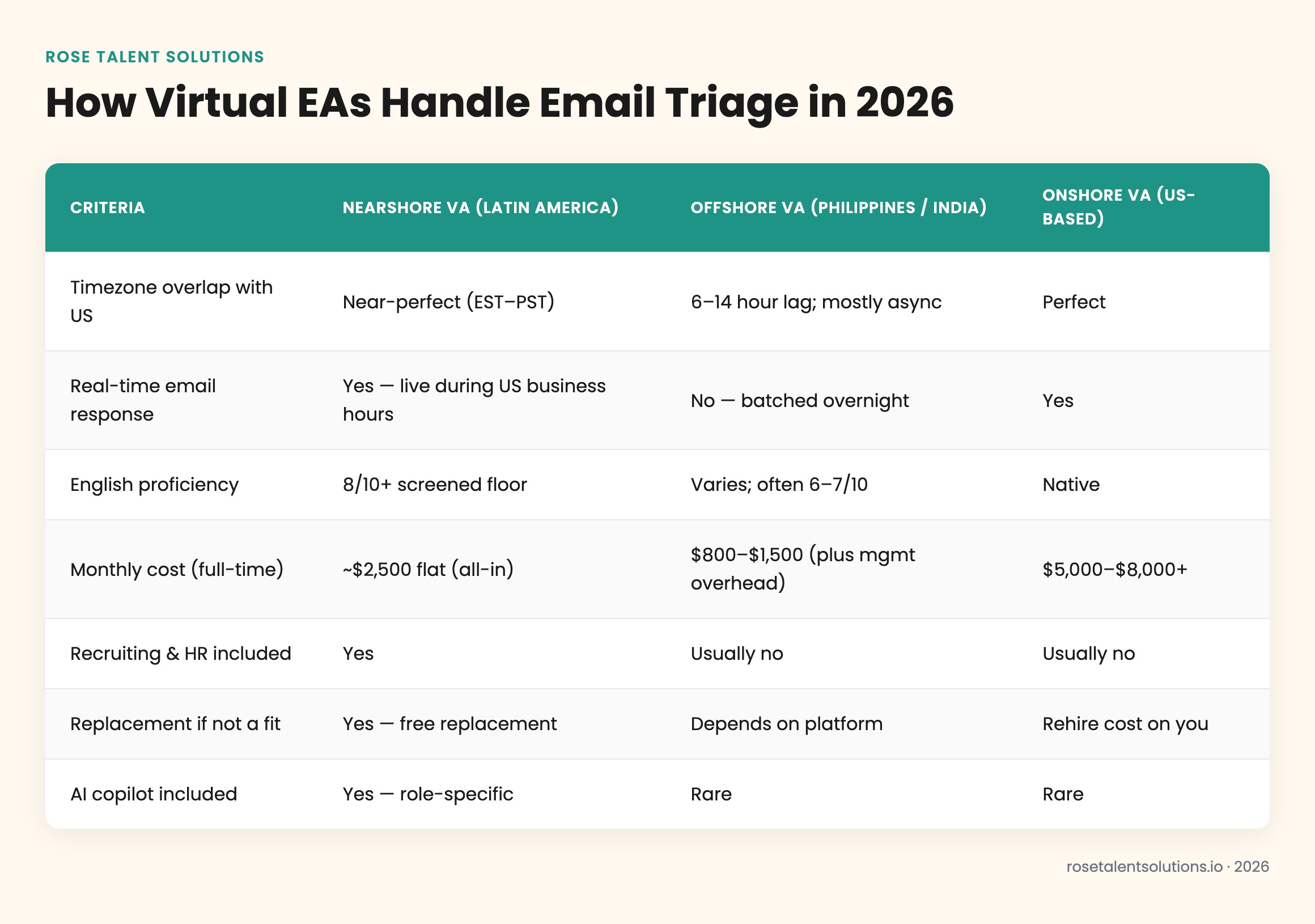
Not all virtual EAs are equal when it comes to real-time inbox management. The comparison below reflects how timezone alignment, language proficiency, and cost stack up across the three main sourcing models.
| Criteria | Nearshore VA (Latin America) | Offshore VA (Philippines / India) | Onshore VA (US-based) |
|---|---|---|---|
| Timezone overlap with US | Near-perfect (EST–PST) | 6–14 hour lag; mostly async | Perfect |
| Real-time email response | Yes — live during US business hours | No — batched overnight | Yes |
| English proficiency | 8/10+ screened floor | Varies; often 6–7/10 | Native |
| Monthly cost (full-time) | ~$2,500 flat (all-in) | $800–$1,500 (plus mgmt overhead) | $5,000–$8,000+ |
| Recruiting & HR included | Yes | Usually no | Usually no |
| Replacement if not a fit | Yes — free replacement | Depends on platform | Rehire cost on you |
| AI copilot included | Yes — role-specific | Rare | Rare |
According to SHRM's workforce research (2024), companies that prioritize real-time communication alignment in remote roles report 34% faster resolution times on customer-facing tasks. For an EA managing your inbox, "customer-facing" includes every vendor, client, and partner who emails you.
What Tasks Can a Virtual EA Handle Inside Your Inbox Every Day?
A fully deployed virtual EA isn't just triaging — they're executing a wide range of email-adjacent tasks that collectively free up two to four hours of your day. The scope is broader than most executives initially expect.
Core inbox tasks include: reading and categorizing all inbound mail, drafting replies for your approval or sending pre-approved templated responses, unsubscribing from irrelevant lists, forwarding action items to the right team members, scheduling follow-up reminders, and maintaining a running log of open threads. Beyond the inbox itself, the EA often manages your calendar in tandem — a meeting request arrives, the EA checks your availability, proposes a time, and sends the invite without you touching it.
The real ROI of EA inbox management isn't the time saved reading email — it's the cognitive load eliminated. Decision fatigue from 150 daily emails is a documented performance killer. When your EA filters that to 10 flagged items requiring your input, you make better decisions on the things that actually matter.
Email management also pairs naturally with other executive support functions. Many Rose clients discover that the same EA handling their inbox also manages vendor communications, client onboarding sequences, and even coordinates their email marketing campaigns — making the monthly cost dramatically more efficient than hiring for a single function. And if your business runs paid acquisition alongside email, it's worth knowing whether a virtual marketing assistant can also run your Google Ads — many operators bundle these roles once the EA is up to speed.
According to Harvard Business Review (2019), executives who delegate inbox management to a trained assistant reclaim an average of 2.1 hours per workday. At a conservative $200/hour executive rate, that's $420 of reclaimed value daily — or roughly $8,800/month against a $2,500 EA cost.

How to Choose the Right Virtual EA for Email Management in 2026
Not every VA is built for inbox ownership. Email management requires a specific combination of language precision, organizational discipline, discretion with sensitive information, and the confidence to make low-stakes decisions independently. When you're evaluating candidates — or evaluating EA service providers — these are the non-negotiables.
Green Flags in an Email Management EA
- Writes in clear, professional English without grammatical errors (8/10+ proficiency screen)
- Can describe a priority triage system they've used previously
- Has experience with your email client (Gmail, Outlook, Front, Superhuman)
- Asks clarifying questions about your communication style before taking over
- Comfortable sending replies under your name without micro-approval
Red Flags to Screen Out
- Vague answers about how they handle urgent vs. non-urgent email
- No experience with filters, labels, or rules-based inbox architecture
- Requests approval for every single outgoing message (not scalable)
- Significant timezone gap that prevents real-time response during your work hours
- No prior exposure to AI drafting tools or email automation platforms
Rose screens every EA candidate specifically for communication clarity and inbox management competency before placement. The English proficiency floor is 8/10 — not a soft suggestion but a hard gate in the vetting process. Combined with role-specific AI copilot training and a no long-term contract month-to-month structure, the risk of a poor fit is low — and if it happens, Rose replaces the team member at no additional cost.
If your needs extend beyond inbox management into brand presence and audience growth, the same vetting standards apply to social-media-focused roles — see how Rose approaches virtual social media manager placements for context on the broader executive support stack.
According to Gallup's workplace research (2023), employees who feel their role has clear ownership and defined scope are 21% more productive — which is exactly why handing an EA defined inbox ownership (rather than ad-hoc help) produces measurably better outcomes than part-time VA arrangements.
Ready to hand off your inbox? Visit the get started page to tell Rose what your EA needs to handle — most placements go live within a week.